How to Prompt Ilus AI
Here are some prompting tips to help you get the best results from Ilus AI.
Prompt Structure
Subject: This is the main focus of your image. It could be a person, animal, object, or scene. For example, you could specify "a woman" or "a cat".
Description:This provides more details about the subject, such as its pose, expression, clothing, or surroundings. For example, you could specify "with blonde hair and a red dress" or "sitting on a chair."
Environment:This describes the setting of the image. For example, you could specify "a forest" or "a beach."
Extra information:This includes any additional details you want to include, such as colors, lighting, or mood. For example, you could specify "warm lighting" or "a mysterious mood."
The order you use these elements in can be flexible, but this is a general guideline.
Example:
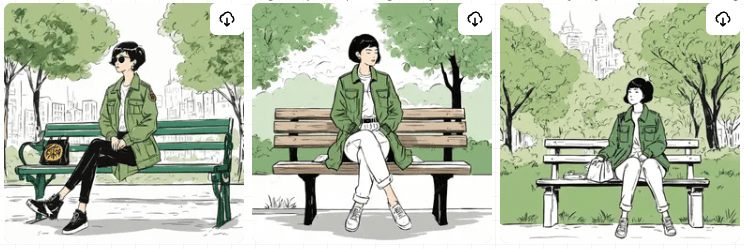
Asian woman with short black hair and a green jacket, sitting on a park bench on a sunny day
Use Chat GPT
Chat GPT is a large language model that can be used to generate different variations of your prompt. For example, you could ask Chat GPT to give you a list of adjectives to describe a woman's smile. This can be helpful if you're stuck and can't think of the right words to use.
General tips
If you are not getting the style you want, it sometimes helps to add the style in the prompt, even if the model is fine-tuned. For example, if you want a minimalistic illustration, you could add "minimalistic" to the end of the prompt. If you are not getting the object/character you desire, it helps to change the wording, even if the meaning is the same. For example, you could change "wall light" to "lamp on the wall." ChatGPT can also be used to generate the same prompts with different wordings.